Toyota
- 4.7
- Rating
- 5.00M
- Installs
- Free
- Price

 Analysis by App-foxy
If you drive a compatible Toyota, the Toyota app is best understood as a digital companion for ownership rather than a general driving tool. I found it most useful when I wanted vehicle information in one place, without moving between a manufacturer website, a paper manual, and unrelated phone apps. It is a free Auto & Vehicles app from Toyota Motor North America, Inc., rated for Everyone, and its purpose is fairly focused: helping Toyota owners stay connected with their vehicle and the brand’s ownership services.
The first thing to check is compatibility. The app supports vehicles from 2010 onward, while Hawaii has a newer-vehicle requirement beginning with 2018 models. That distinction matters because installing the app does not automatically mean every Toyota owner will receive the same experience. Your vehicle, model year, location, and the connected services available to that vehicle can affect what appears after you sign in.
I would recommend approaching it with one realistic expectation: it can make ownership more convenient, but it does not replace every other tool you use with a car. It is not a substitute for a mechanic, a full navigation application, or the vehicle’s physical controls. Its value comes from putting Toyota-specific information and account functions closer to hand when you are away from the driver’s seat.
You May Also Like

 Blood Strike: 2.5 Anniversary
Blood Strike’s Loadouts Turn Every Drop Into a Tactical Gamble
A close look at Blood Strike’s custom loadouts: how fast access to signature weapons reshapes its battle royale rhythm, rewards preparation, and narrows the gap between fights.

 Pandora - Music & Podcasts
Pandora’s Music Is Easy to Start, but Harder to Recover
Pandora’s strength is its low-effort path from a seed to a station. Its weak spot is how much confidence it asks you to place in connection, setup, and quiet recovery.

 8 Ball Pool
 Is Built on Rivalries, Rematches, and Routine
A close look at the rivalries, rematches, shared routines, and unanswered safety questions that turn a quick pool match into a persistent mobile community.

 Samsung Music
’s Quiet Strength Is Playing What You Already Own
Its reach comes less from spectacle than from dependable access to a personal library. That simplicity is both the app’s strongest retention engine and its ceiling.

 AccuWeather: Weather Radar
AccuWeather Review: A Quick, Clear Forecast for Everyday Decisions
For everyday plans, the best forecast is the one you can understand quickly. AccuWeather makes rain timing, radar, and local conditions easy to act on, with a few trade-offs.

 Hill Climb Racing
Why Hill Climb Racing Still Turns Crashes Into One More Run
A tiny car, a bumpy hill and one more upgrade: Hill Climb Racing keeps resurfacing because its simple chaos makes every near-miss feel personal.
More From Our News Desk
View All News


Getting from installation to a useful first result
I’d treat the first session as a quick check that the account and car are properly matched, rather than a tour of every screen. Once the right vehicle appears, choose one ownership detail you’re likely to need soon and see how easily you can reach it; that gives you a practical measure of whether the app belongs in your routine. Next, it’s worth looking at which parts of the experience depend on the vehicle itself.
What I would check before installing
Before downloading, I would identify the exact Toyota model year and consider where the vehicle is registered or primarily used. The Hawaii requirement is an easy detail to overlook, especially if you have moved, recently purchased a used vehicle, or are helping a family member set up the app. Knowing this beforehand prevents the common disappointment of expecting a connected experience that your vehicle or region may not support.
The application requires at least Android 10, so an older phone may need an operating-system update before installation. On iPhone, the practical concern is still device and account compatibility, but the most important preparation is having the information associated with your Toyota ownership available. I would also install it while connected to a reliable network and keep the vehicle identification details nearby rather than trying to remember them halfway through setup.
Because the app is free, the decision is not really about purchase cost. The more useful question is whether your Toyota is recent or connected enough to benefit from the functions presented in your account. A driver with an older vehicle may still appreciate vehicle information, but should not assume that every connected option shown in promotional material will appear for that car.
Creating a calm first setup
My advice is to treat setup as an ownership-account process, not as a quick app launch. Install Toyota, open it, and follow the sign-in or account-creation steps carefully. Use an email address you expect to keep for the vehicle, because changing account details later can be more annoying than choosing the right address at the start.
When the app asks you to associate a vehicle, slow down and check every character. A single mistaken digit can lead to a confusing result: the app may appear empty, show an incomplete vehicle profile, or fail to connect the account to the car you actually own. This is one of those small setup details that is easy to dismiss but can save a lot of troubleshooting later.
I would also keep the vehicle parked while completing the initial process. Even when the phone portion is straightforward, it is better to avoid doing account work from the driver’s seat with the engine running or while preparing to leave. Finish the account, confirm the vehicle profile, and only then explore what the app offers for that specific Toyota.
The first screen may feel less important than the vehicle connection itself, but it is worth checking whether the displayed model and ownership details look correct. If something is wrong, correcting the account association early is much easier than building a routine around incomplete information.
The first meaningful success
For a first-time user, the best initial goal is not to explore every menu. It is to complete one useful ownership task successfully. I would open the vehicle area, confirm that the correct Toyota is selected, and look for the information or service action that is relevant to my immediate need. That might mean reviewing vehicle details before a trip, checking available ownership resources, or locating the next step for maintenance planning.
This approach makes the app less overwhelming. Instead of judging it by how many screens it contains, I judge it by whether it saves me a small amount of time in a real situation. If I can check the right vehicle profile and reach the information I need without searching through several unrelated services, the setup has already paid off in convenience.
A realistic example is preparing for a weekend drive in a car shared by two people. Rather than asking which Toyota is registered to the account or searching through old documents, I would use the app to confirm the vehicle profile and review the ownership information available there. If a service-related question comes up, I can begin from the Toyota-specific account instead of guessing which third-party source is current.
Another useful habit is to explore the app when you are not in a hurry. If you wait until you are standing in a parking lot with a low phone battery or trying to solve a problem before work, even a simple menu can feel frustrating. A quiet first session lets you learn where the vehicle section, account details, and support-oriented areas live.
Why the vehicle profile matters more than the brand name
The app’s usefulness depends heavily on the relationship between the account and the actual Toyota. This is not just a generic Toyota news or shopping application. The experience becomes more personal when the correct vehicle is attached, which is why the model year and ownership information deserve attention during setup.
This also explains why two Toyota owners may describe the app differently. A driver of a supported connected vehicle may see options that another owner does not. A person using the app in Hawaii may face a different compatibility boundary from someone elsewhere. I would not interpret a missing function as a universal app failure until I had checked the vehicle and regional requirements.
For used-car buyers, the account connection deserves extra care. I would confirm that the vehicle is associated with my own Toyota account and that the displayed information matches the car in my driveway. If the previous owner’s details or an old account relationship causes confusion, the sensible next move is to use Toyota’s official support route rather than repeatedly reinstalling the app.
Common confusion during everyday use
The most likely misunderstanding is assuming that installation equals full vehicle connectivity. It does not. The app supports 2010-or-newer vehicles in its stated coverage, with the Hawaii exception beginning at 2018, but individual functions can still depend on the vehicle and the services available to it. I would therefore read the vehicle-specific screens as the source of truth for my car, not assume that another Toyota owner’s experience will be identical.
A second point of confusion is the difference between information and action. Seeing vehicle details in an app does not mean the phone can perform every task that the car itself can perform. Some actions may require the appropriate connected setup, while others are better handled directly through the vehicle controls or a Toyota service channel. When an option is unavailable, that may reflect the vehicle configuration rather than a broken installation.
People also sometimes expect the app to function like a standalone navigation replacement. That is not how I would use it. For route planning, traffic awareness, and turn-by-turn driving, a dedicated navigation service may be more familiar and flexible. Toyota’s advantage is the manufacturer-specific connection to ownership information, not necessarily breadth across every driving scenario.
Another small source of friction is account switching. If more than one person in a household drives a Toyota, I would decide who should maintain the primary vehicle relationship before creating several loosely connected accounts. Sharing a phone or signing in and out repeatedly can make the experience feel unreliable, even when the app itself is working as intended.
Notifications can also become less useful if they are treated as the only way to remember vehicle responsibilities. I prefer using the app as one part of a routine: check it when preparing for a trip or reviewing ownership tasks, then keep important dates and appointments in the calendar system I already trust. That avoids depending on a single alert for something important.
Where it stands beside the usual alternatives
Compared with a paper owner’s manual, Toyota is easier to carry and quicker to consult when I have my phone nearby. Compared with a generic vehicle-maintenance app, it has the advantage of being tied to Toyota ownership rather than asking me to enter every detail manually. Compared with a dealership website, it feels more convenient for quick checks because the vehicle relationship can be available from the phone.
Those comparisons also show its limits. A paper manual remains useful when the phone is unavailable, and a general maintenance tracker may be better for someone who owns several brands and wants one combined service history. A dealership’s direct support may still be the better choice when a problem needs human explanation or repair scheduling rather than account information.
I would choose Toyota over a generic alternative when I mainly drive one compatible Toyota and want manufacturer-specific ownership access. I would choose a broader vehicle-management tool when I manage multiple cars, need cross-brand records, or want a highly customized maintenance log. The right choice depends less on the app’s rating and more on whether your daily driving matches its focused purpose.
Three practical habits that improve the experience
- Verify the car before exploring features. If the wrong vehicle is attached, every later screen becomes harder to interpret. Confirm the model and ownership relationship first.
- Use the app before you need it. Open it during a quiet moment, learn the vehicle area, and identify the support path. That preparation is more valuable than discovering the menus during a roadside problem.
- Separate connected functions from basic ownership information. A vehicle profile can be useful even when a particular remote or connected action is not available for your Toyota. Judge each function independently.
A fourth habit is especially helpful for households: decide who will keep the account details organized. If several drivers use the same vehicle, inconsistent sign-ins and duplicated profiles can create more confusion than the original paper documents. One clearly maintained account, with other drivers understanding how access works, is usually the cleaner arrangement.
Who will appreciate it most
I think Toyota is a strong fit for a first-time Toyota owner who wants a straightforward starting point for digital ownership. It is also useful for people who often leave their vehicle at home and want to review Toyota-related information from the phone rather than searching for documents. Its free price makes it easy to try when the vehicle meets the compatibility requirements.
It can be particularly convenient for families sharing a car, provided everyone agrees on the account arrangement. It may also help a used-Toyota buyer organize ownership information after purchase, although I would spend extra time making sure the vehicle is properly separated from any previous owner’s account.
I would be more cautious if you drive an older or unsupported vehicle, live in Hawaii with a vehicle below the stated model-year threshold, or mainly want a universal maintenance tracker. I would also skip it as a primary tool if your main need is advanced navigation, detailed repair logging, or support for several different vehicle brands.
What the app’s reputation tells me
Toyota has an average rating of 4.5 from around 126 thousand ratings, with over a million installs. That suggests the app has reached a substantial audience and that many owners find its basic purpose worthwhile. I treat that as useful context, not a guarantee: connected-car apps are highly dependent on the vehicle, account, and region, so a strong overall score cannot promise that every screen will appear for every driver.
The app has been available since August 6, 2019, and its continued presence makes sense for a manufacturer that wants ownership services to travel with the customer. Still, I would evaluate it by the first successful task on my own Toyota rather than by popularity alone. If the correct vehicle appears and the app reduces a real bit of ownership friction, it is doing its job.
My recommendation after the first week
After the initial setup, I would give myself a week to use Toyota naturally instead of forcing a reason to open it every day. Check it when preparing for a trip, reviewing vehicle information, or deciding where to start with a service question. That short trial reveals whether it fits your routine better than a generic alternative.
If the app consistently leads me to the right Toyota-specific information, I would keep it installed. If I only need a broad maintenance log or navigation, I would use another tool alongside it rather than expecting Toyota to cover everything. The strongest setup may be a combination: Toyota for manufacturer-linked ownership access, a calendar for reminders, and a navigation or maintenance app for tasks outside its focus.
My overall view is positive but practical. Toyota is not trying to be every automotive app at once, and that is part of its appeal. It gives compatible Toyota owners a focused place to begin, especially when the account and vehicle are matched correctly. Its real strength is reducing small ownership hassles, not replacing the entire driving toolkit.
If you meet the compatibility requirements and drive a Toyota regularly, I think it is worth trying because the price is free and the first useful result can come quickly after setup. Just begin with the vehicle check, keep expectations tied to your specific model and region, and remember that a missing connected option may be a compatibility issue rather than a setup mistake. With that approach, the app feels less like another dashboard to manage and more like a sensible companion for everyday Toyota ownership.
FAQs for Toyota
01What features does the Toyota app offer?
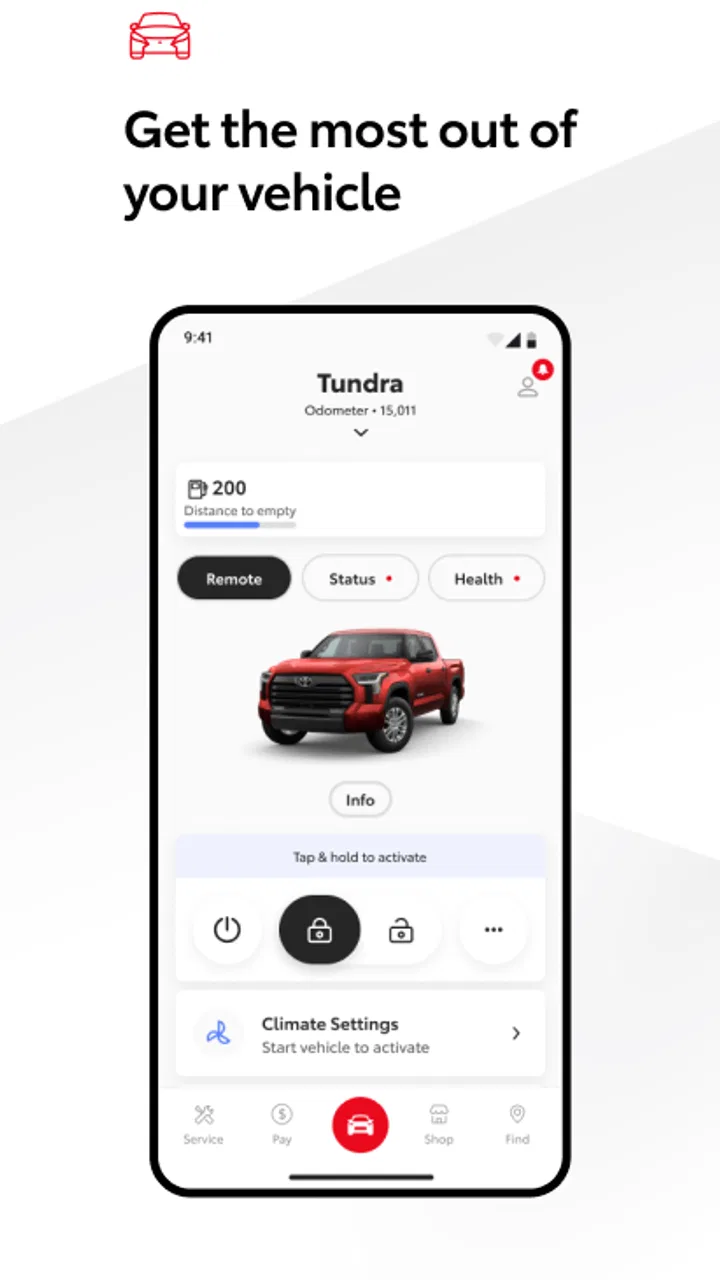
The Toyota app provides a comprehensive suite of features designed to enhance your driving experience. Users can access remote start and lock functionalities, vehicle health reports, maintenance reminders, and navigation assistance. Additionally, the app offers integration with smart home devices and access to exclusive Toyota content, making it a versatile tool for Toyota owners.
02Is the Toyota app compatible with all Toyota models?
The app is compatible with most Toyota models, particularly newer ones that support connected services. However, functionality may vary based on the model and year of your vehicle. It’s recommended to check the compatibility list on the app’s official site or contact your local Toyota dealer for specific details regarding your car.
03Does the Toyota app require a subscription?
While the Toyota app itself is free to download, some features may require a subscription to Toyota’s connected services. These premium features often include advanced remote operations and in-depth vehicle diagnostics. It’s advisable to review the app’s pricing details to understand what services might incur additional costs.
04How secure is the Toyota app?
Toyota prioritizes user security and data protection. The app uses encryption and other security measures to safeguard user data and ensure that remote functions are securely operated. Regular updates are provided to enhance security features, but users are encouraged to update their app regularly and use strong passwords.
05Can I use the Toyota app without an internet connection?
Certain features of the Toyota app, such as remote operations and live vehicle tracking, require an internet connection. However, some functionalities, like accessing saved vehicle information or offline maps, may still be available without connectivity. To fully utilize all features, a stable internet connection is recommended.
Pros
- User-friendly interface makes navigation easy.
- Comprehensive vehicle maintenance tracking.
- Real-time vehicle health alerts.
- Remote control features for added convenience.
- Detailed trip history and analytics.
Cons
- Limited compatibility with older vehicle models.
- Some features require a stable internet connection.
- Initial setup can be time-consuming.
- Occasional app crashes reported by users.
- Certain features locked behind a paywall.

Toyota
Gallery